
Building a macOS Video Editor with Rust + UniFFI: A Solo Founder's Architecture
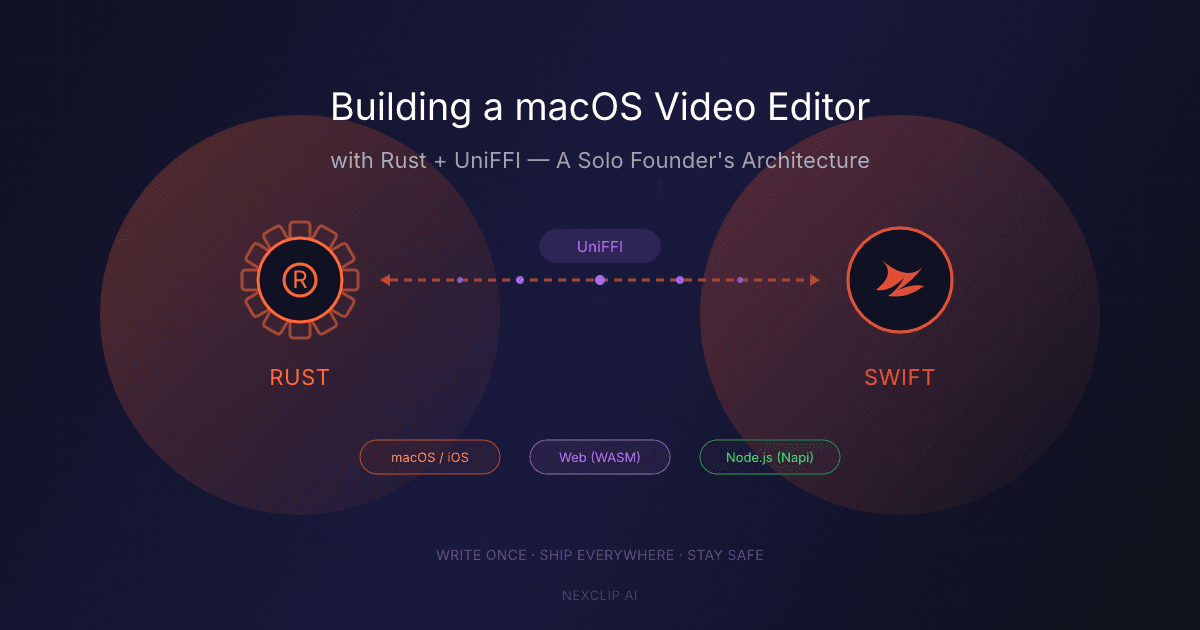
I'm building NexClip AI, an AI-powered video editor for long-form creators on macOS. As a solo founder, I needed to write the core engine once and share it across platforms. Here's how Rust + UniFFI made that possible.
The Problem
Video editors face a significant bottleneck: identifying highlight clips from lengthy footage. A 45-minute lecture video can require a full day of manual work — watching, identifying topics, reading transcripts, mapping timestamps, and creating clean clips.
NexClip AI automates this through a pipeline:
- Transcription — speech-to-text with word-level timestamps
- NLP Processing — Japanese/English sentence and phrase segmentation
- Timecode Correction — refining segment boundaries for precision
- Clip Planning — creating clips from selected topics
Step 1 (transcription) calls a cloud STT API — audio only; the video never leaves the machine. Steps 2-4 are compute-intensive and require on-device execution. I needed a language that could handle this efficiently — and run everywhere.
Why Rust?
Performance without compromise
Timecode correction analyzes audio RMS data, detects silence regions, and adjusts boundaries in real time. Rust compiles to native code with zero runtime overhead.
Memory safety guarantees
Word-level timing data involves thousands of structs with precise floating-point boundaries. Rust's ownership model prevents the bugs that would haunt me in C/C++.
Write once, run everywhere
The same Rust crate compiles to a static library for macOS/iOS (via UniFFI), a WASM module for the web, and a native Node.js addon (via Napi). One implementation, three platforms.
Crate Architecture
crates/
├── kirinuki-core          # Shared types & error definitions
├── kirinuki-timecode      # Timecode correction engine
├── kirinuki-clip          # Clip planning & optimization
├── kirinuki-nlp           # Japanese NLP engine
├── kirinuki-nlp-english   # English NLP engine
├── kirinuki-ffi-swift     # Swift bindings (UniFFI)
└── kirinuki-ffi-node      # Node.js bindings (Napi)
Each crate has a single responsibility. FFI crates are thin wrappers that convert between platform types and core types — no business logic lives in the FFI layer.
Core Types: The Foundation
pub struct Segment {
    pub start: f64,      // seconds
    pub end: f64,
    pub text: String,
    pub confidence: Option<f64>,
    pub words: Vec<Word>,
}

pub struct Word {
    pub start: f64,
    pub end: f64,
    pub word: String,
    pub confidence: Option<f64>,
}
These types flow through the entire pipeline — from transcription to final clip plan. Simple, flat, and easy to serialize across FFI boundaries.
Timecode Correction: Where Precision Matters
Speech-to-text timestamps are approximate. A word reported at 2.34s might actually begin at 2.31s. Over hundreds of words, errors compound.
The timecode correction engine processes segments through multiple refinement stages — analyzing audio characteristics, aligning boundaries to natural break points, and resolving conflicts — achieving millisecond-level accuracy.
pub fn adjust_all_segments(
    segments: &[Segment],
    options: &AdjustOptions,
) -> AdjustmentResult
Result: segment boundaries accurate to within a few milliseconds.
Japanese NLP: From GiNZA to Vibrato
Originally, I used a Python-based NLP library (GiNZA) running in a Docker container. The problems were obvious:
- • Cold start: ~10 seconds
- • Required Python runtime
- • Network round-trip overhead
- • Couldn't run on-device
Migrating to Vibrato — a pure Rust morphological analyzer — eliminated Docker, Python, and network dependencies entirely. Japanese sentence segmentation, phrase detection, and part-of-speech tagging now run natively inside the app.
UniFFI: The Bridge to Swift
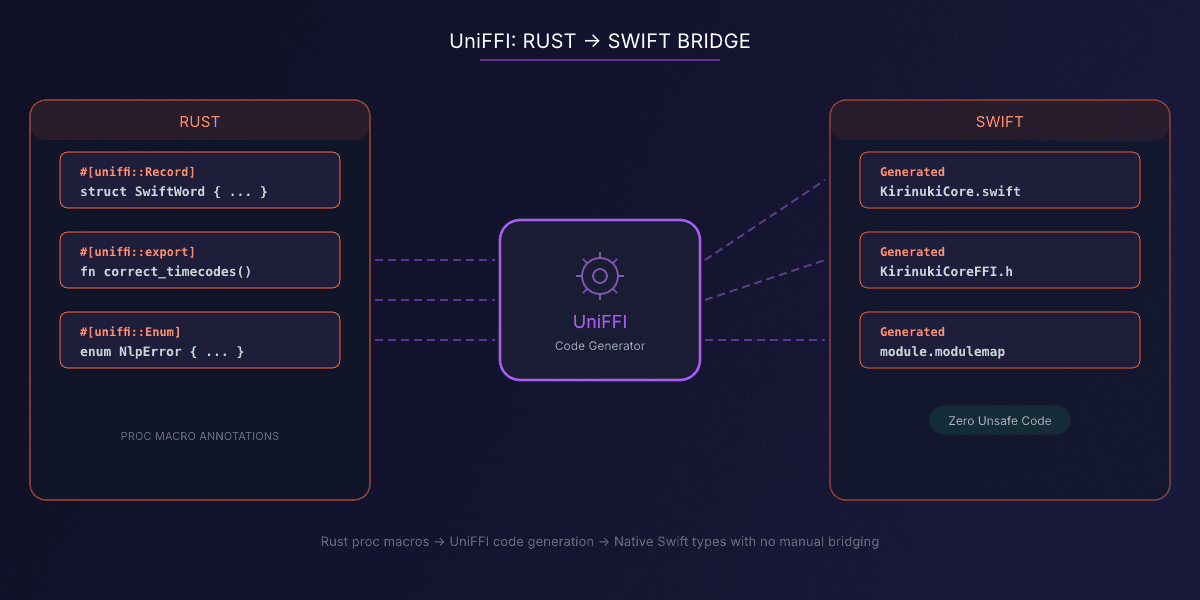
UniFFI (by Mozilla) generates Swift bindings from Rust code automatically. No manual C headers required.
#[derive(Debug, Clone, uniffi::Record)]
pub struct SwiftWord {
    pub start: f64,
    pub end: f64,
    pub word: String,
    pub confidence: Option<f64>,
}

#[uniffi::export]
pub fn correct_timecodes(
    segments: Vec<SwiftSegment>,
    options: Option<SwiftAdjustOptions>,
) -> SwiftAdjustmentResult {
    let core_segments = segments.into_iter()
        .map(Into::into).collect();
    let core_options = options
        .map(Into::into).unwrap_or_default();
    let result = kirinuki_timecode::adjust_all_segments(
        &core_segments, &core_options,
    );
    result.into()
}
UniFFI generates a .swift file with native Swift types, a C header for the FFI boundary, and a module map for Xcode. The generated Swift code looks native to callers — no UnsafePointer in sight.
The Build Pipeline
# 1. Compile Rust → static library
cargo build --release -p kirinuki-ffi-swift \
  --target aarch64-apple-darwin

# 2. Generate Swift bindings
cargo run -p kirinuki-ffi-swift --bin uniffi-bindgen \
  -- generate \
  --library target/.../libkirinuki_ffi_swift.dylib \
  --language swift --out-dir Sources

# 3. Package as XCFramework
xcodebuild -create-xcframework \
  -library target/.../libkirinuki_ffi_swift.a \
  -headers Headers \
  -output KirinukiCore.xcframework
The XCFramework is consumed as an SPM binary target:
let package = Package(
    name: "KirinukiCore",
    platforms: [.macOS("26.0"), .iOS(.v16)],
    targets: [
        .binaryTarget(
            name: "KirinukiCoreFFI",
            path: "KirinukiCore.xcframework"
        ),
        .target(
            name: "KirinukiCore",
            dependencies: ["KirinukiCoreFFI"]
        ),
    ]
)
Swift Side: Actor-Based Services
Each Rust module maps to a Swift actor:
actor TimecodeService {
    func correctTimecodes(
        _ segments: [Segment],
        options: SwiftAdjustOptions? = nil
    ) async -> CorrectionResult {
        await Task.detached(priority: .userInitiated) {
            let swiftSegments = segments
                .map { $0.toSwiftSegment() }
            let result = KirinukiCore.correctTimecodes(
                segments: swiftSegments,
                options: options
            )
            return CorrectionResult(from: result)
        }.value
    }
}
Actors provide thread safety. Task.detached keeps heavy computation off the main thread, keeping the UI responsive.
Lessons Learned
UniFFI proc macros > UDL files
Proc macros keep type definitions in Rust code — no separate schema file to maintain.
Keep FFI types flat
Nested enums and complex generics don't cross FFI boundaries well. Use simple structs with Option<T> for nullable fields.
Singleton pattern for heavy resources
NLP dictionaries are large. Load once at startup, reuse throughout the session.
Bidirectional conversions are unavoidable
Every type needs From<SwiftType> for core type conversions and vice versa. It's boilerplate, but keeps core logic clean and platform-agnostic.
Test the Rust layer independently
Unit tests in Rust run in milliseconds. Don't wait for Xcode builds to verify algorithm correctness.
The Result
7
Rust crates
70+
exported functions
0
unsafe Swift code
1
build script
As a solo founder, Rust + UniFFI lets me write performance-critical code once and ship it everywhere. The initial setup cost is real, but the payoff is enormous. For native apps requiring serious computation, Rust with UniFFI provides a surprisingly painless bridge.
Frequently Asked Questions
Why use Rust instead of Swift for the core engine?
Rust provides memory safety, zero-cost abstractions, and cross-platform compilation. The same crate compiles to macOS/iOS, web (WASM), and Node.js. Writing the core once in Rust avoids maintaining separate implementations per platform.
What is UniFFI and how does it work with Swift?
UniFFI is a Mozilla project that generates Swift bindings from Rust code automatically. Annotate Rust structs and functions with UniFFI proc macros, and it generates native Swift types, a C header, and a module map for Xcode. No manual bridging required.
How many Rust crates does NexClip AI use?
Seven: kirinuki-core (shared types), kirinuki-timecode (timecode correction), kirinuki-clip (clip planning), kirinuki-nlp (Japanese NLP), kirinuki-nlp-english (English NLP), kirinuki-ffi-swift (Swift bindings), and kirinuki-ffi-node (Node.js bindings). Together they export 70+ functions via UniFFI.
Try NexClip AI
Free for macOS. Import a video, see every topic extracted by AI, and select what matters.
Try Free for macOS
NexClip AI
Topic-Based Editing: Pick your topics. Get your clips.
Related Articles
Topic-Based Editing for Educators
Use CaseTopic-Based Editing for Podcasters
Comparisonvs AI Auto-Clipping (OpusClip)
ComparisonTopic-Based vs Text-Based vs Timeline Editing
Comparisonvs Munch & Vizard
Comparisonvs Chat-Based Editing (Riverside, Cutback)
Comparisonvs Prompt-Based Editing
Comparison7 Best OpusClip Alternatives for Long-Form Video